Creating a Concierge Agent
The Concierge agent replaces static forms with intelligent conversational experiences that use an infer-and-validate approach. Rather than asking every question, it infers details from what participants share, pre-fills what it can determine, and progressively narrows its questions based on responses—making data collection feel effortless.
When to Use a Concierge Agent
Concierge agents excel when you need:
-
Efficient structured data collection – You know exactly what information you need
-
Context-aware questioning – Skip redundant questions by inferring from what's shared
-
Progressive narrowing – Start broad and get more specific based on responses
-
Adaptive field collection – Adjust question order based on what's already known
-
Conversational validation – Confirm inferences naturally rather than through form fields
-
Form replacement – Convert existing static forms into conversations
Ideal use cases:
-
Onboarding flows that adapt to user context
-
Lead qualification that infers company details
-
Support intake that routes based on issue description
-
Application processes with conditional requirements
-
Converting existing web forms to conversational experiences
-
Any scenario where you're replacing a static form
How Concierge Agents Work
Concierge agents use an infer-and-validate methodology that:
Starts broad – Opens with a human question that invites context rather than requesting specific fields
Infers aggressively – Extracts and pre-fills field values from what participants share in conversation, URL parameters, and available context
Skips known fields – Never asks for information it has already captured or can reliably infer
Validates briefly – Confirms sensitive or uncertain inferences with quick checks
Adapts question order – Sequences questions based on what's been shared, not a fixed form structure
Weaves field capture – Collects data through natural questions, never exposing field labels
Uses mini-summaries – Confirms understanding and surfaces remaining gaps before moving on
Focuses tightly – Concludes only after capturing all required fields or explicit declines
Typically efficient – Aims for around 5-10 questions depending on complexity
Example of inference in action:
Participant says: "I'm just looking at all my options right now, no rush."
System infers: urgency = "low", timeline = "exploring"
Participant says: "We're a 200-person company and really need this integrated with Salesforce."
System infers: company_size = "200", integration_needs = "yes", specific_integration = "Salesforce"
Before You Begin
Decide: Converting or Creating?
Do you have an existing web form you want to make conversational? If so, Concierge agents can analyze it and extract all the fields automatically. If not, you'll define the information you need from scratch.
Define Required Information
If creating from scratch, list all fields you need:
-
Always required – Must have for every participant
-
Conditionally required – Needed based on other answers
-
Nice to have – Valuable but not blocking
Identify Inferable Information
What information might be inferred from:
-
What participants share – Company details mentioned casually, urgency signals in how they describe needs, technical requirements embedded in their questions
-
URL parameters – Company domain, referral source, campaign IDs
-
Context clues – Email domains that reveal company names, language that signals experience level
Map Conditional Logic
Document dependencies:
-
If X, then skip Y
-
If A, then ask B and C
-
Route to different outcomes based on Z
Creating Your Concierge Agent
Step 1: Select the Concierge type
-
Navigate to agent creation in Perspective AI
-
From the agent type options, select Concierge
You'll see example prompts to help you get started, such as:
-
"User onboarding flow for a SaaS product"
-
"Customer support intake form"
-
"Event registration with personalized recommendations"
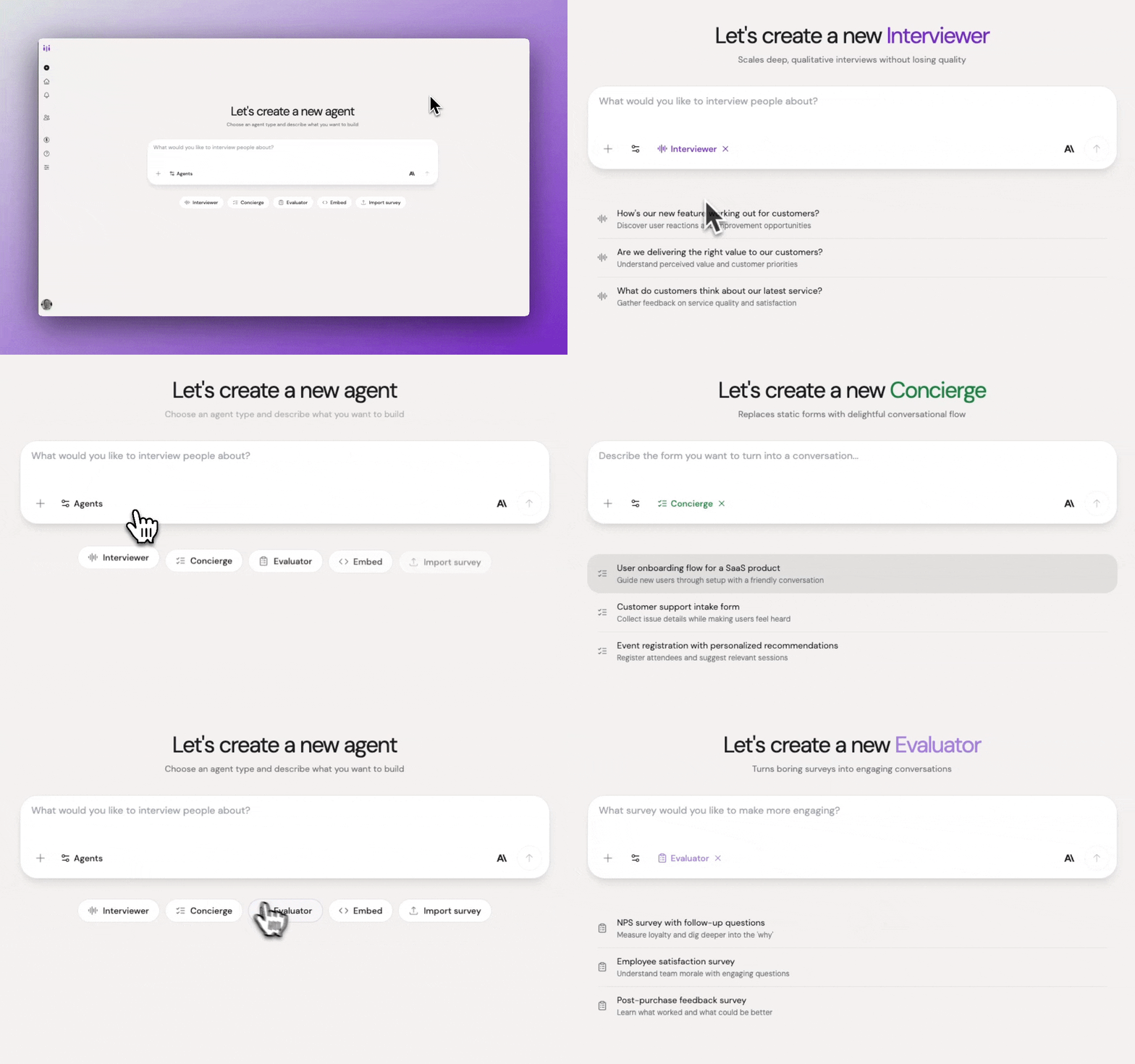
Agent type selection showing Concierge highlighted
Select Concierge for intelligent information collection and form replacement.
Step 2: Provide form URL or describe information needs
Perspective will first ask: "Do you have an existing web form you'd like to convert to a conversational form?"
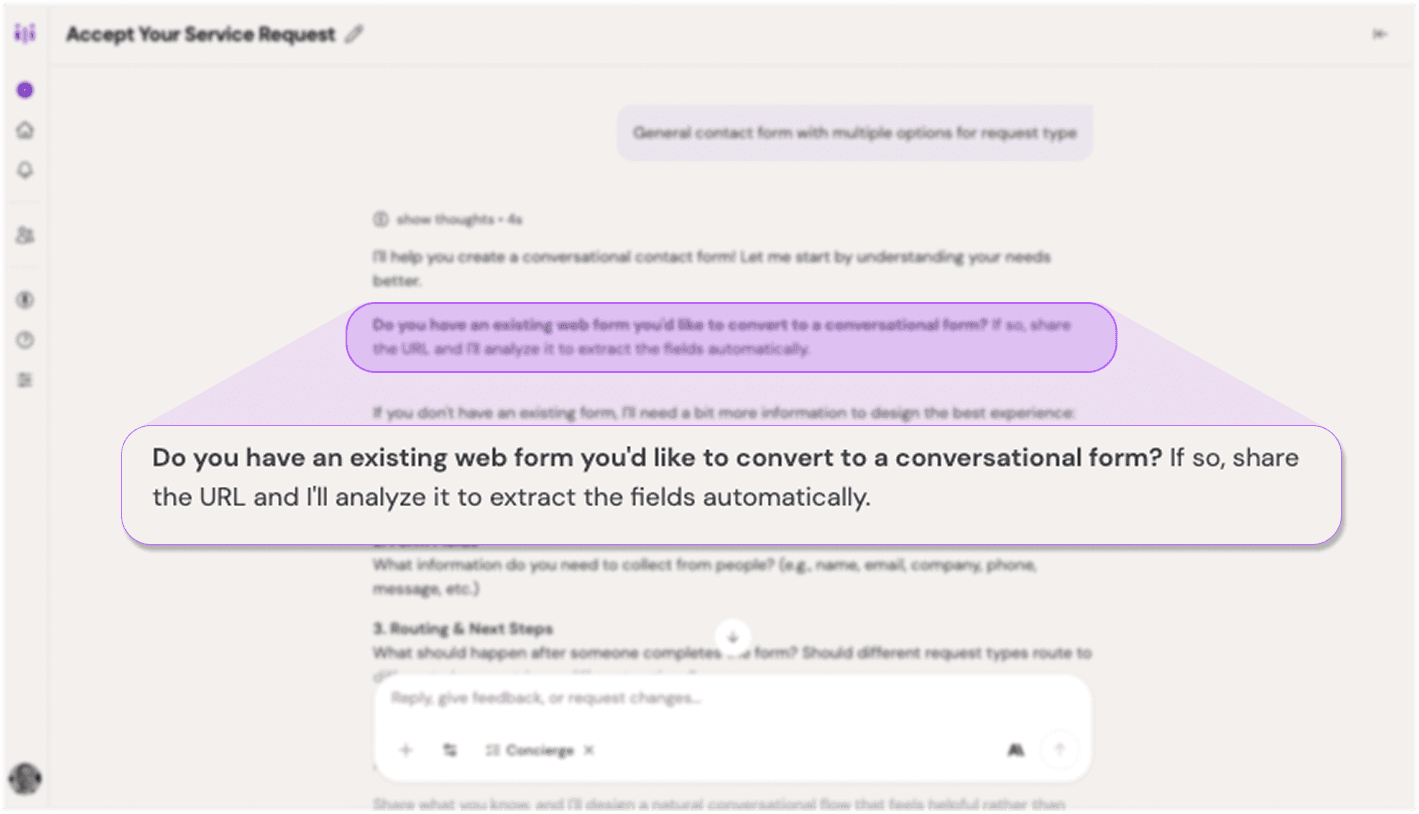
Concierge first question about existing forms
Concierge agents can analyze existing web forms or start from scratch.
If you have an existing form:
-
Provide the URL to your form
-
Perspective will automatically analyze the page and extract:
-
All form fields
-
Field types (text, email, dropdown, etc.)
-
Field labels and placeholders
-
Required vs. optional fields
-
Multi-step forms if present
-
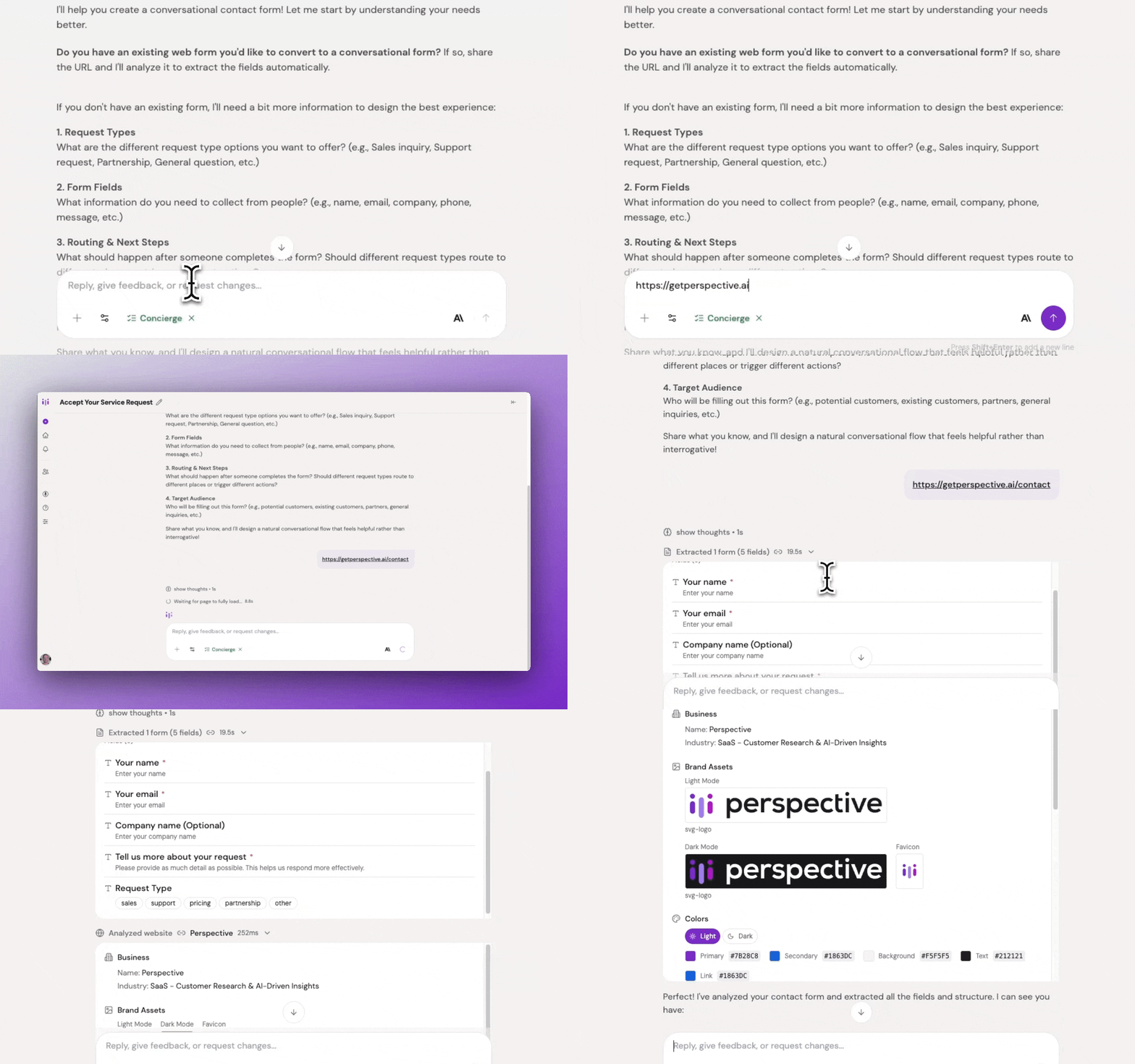
Form analysis extracting fields automatically
Watch as Perspective analyzes your form and extracts all fields automatically.
-
If multiple forms are found on the page, you'll be asked to select which one to use
-
Review the extracted fields and confirm or adjust as needed
-
Perspective will then ask about your goals, routing logic, and target audience
If you don't have an existing form:
Describe what information you need to collect. Perspective will ask about:
-
Form goal – What happens after completion (routing, processing, next steps)
-
Form fields – What information to collect
-
Field types – Text, selection, date, number, etc.
-
Routing logic – How responses determine where users go next
-
Target audience – Who will be completing this form
Example:
"Collect information to route new enterprise inquiries. I need company name and size, primary use case, decision timeline, and whether they need custom integrations. Route companies over 50 employees with integration needs to enterprise solutions, others to standard sales."
Step 3: Answer clarifying questions
Perspective will ask follow-up questions about:
-
Conditional logic and field dependencies
-
Completion workflows (where users go after finishing)
-
Any fields that need special handling
-
Routing rules based on responses
Step 4: Review the generated outline
Once Perspective has sufficient context, it will generate an outline that includes:
Form goal: What the form accomplishes and what happens after completion
Form fields: Complete structured list of information to collect, with types and requirements
Conditional logic: Rules for when certain fields appear or are skipped
Interview guidelines: Instructions for maintaining conversational flow while efficiently collecting data
Completion workflow: What happens after all information is collected (redirects, routing, etc.)
Methodology: Confirmation of the infer-and-validate approach
Step 5: Refine your agent
Adjust the outline conversationally to match your needs:
Example refinements:
-
"If someone provides a company email domain, infer the company name from it"
-
"Make the tone friendly and helpful, not transactional"
-
"Add a field for budget range before asking about timeline"
-
"If someone mentions urgency in their first response, capture that in the urgency field"
Each refinement updates your outline while maintaining the efficient collection approach.
Step 6: Test the flow
Experience it as a participant would:
-
Click Test or Try it Yourself
-
Try different response styles—mention details casually vs. answering directly
-
Evaluate:
-
Does it catch and infer information correctly?
-
Does it skip questions when it should?
-
Does branching logic work as expected?
-
Is the tone appropriately helpful?
-
Can you complete it quickly?
-
Are there any confusing moments?
-
Step 7: Iterate and launch
Make adjustments based on testing, then invite participants using your preferred method.
Guidelines for Concierge Agents
Guidelines balance conversational warmth with efficient data collection.
Default Approach
Concierge agents naturally:
-
Start with broad, inviting questions
-
Infer field values from what participants share naturally
-
Skip questions about information already captured
-
Confirm understanding with brief validations
-
Use friendly, helpful tone
-
Keep momentum moving toward completion
-
Handle errors gracefully with helpful suggestions
-
Aim for 5-10 questions depending on complexity
Customizing Guidelines
Adjust based on your brand and use case:
For friendly, casual experiences:
"Use conversational language and make users feel welcomed. This should feel like chatting with a helpful person, not filling out bureaucratic forms."
For professional, efficient interactions:
"Be polite and efficient. Provide clear instructions and minimize unnecessary conversation. Users appreciate speed and clarity."
For complex processes:
"Break complex questions into smaller steps. Provide examples and context liberally. Confirm understanding at key decision points before proceeding."
For technical audiences:
"Use precise terminology and don't over-explain. Assume familiarity with technical concepts and move at a faster pace."
Best Practices for Concierge Agents
Start with existing forms when possible. The automatic extraction saves significant time and ensures you capture all necessary fields.
Minimize required fields. Only ask for information you truly need. Every question is friction.
Trust the inference. The agent will catch details participants mention naturally. Don't force direct questions for everything.
Use smart defaults. Pre-fill or suggest likely answers when possible, especially with URL parameters.
Provide examples. Show users what good answers look like for open-ended fields.
Validate as you go. Catch errors immediately rather than at the end.
Explain why you're asking. Brief context helps users provide better answers: "To match you with the right specialist..."
Use multiple choice when possible. It's faster than typing and ensures consistent data.
Group related questions. "Now I'll ask a few questions about your team" creates better flow than random jumps.
Test all conditional paths. Ensure every branch of your logic works correctly.
Make it mobile-friendly. Many participants will complete on mobile devices.
Common Pitfalls & Fixes
Too many questions → Audit ruthlessly. Can the agent infer this from conversation? Can you collect it later? Can you get it from existing data?
Not using form extraction → If you have an existing form, always start by analyzing it. Manual field entry is time-consuming and error-prone.
Poor conditional logic → Test all branches thoroughly. What happens if someone answers unexpectedly? What's the fallback?
Over-conversationalizing → Unlike Interviewer agents, Concierge agents should feel efficient. Don't sacrifice speed for chattiness.
No error handling → Define what happens when users provide invalid responses. Use gentle correction, not frustration.
Form-like language → Avoid "Please enter..." and "Submit." Use natural language: "What's your company name?" and "Got it, thanks!"
No completion clarity → Users should know exactly what happens next. "I've sent this to our team—expect an email within 24 hours."
Forcing linear flow → Allow users to correct earlier answers when appropriate.
Not trusting inference → If a user casually mentions "we're a 50-person startup," the agent should capture company_size = "50" without asking again.
Over-validating → Don't confirm every inferred detail. Only validate sensitive or ambiguous information.
Example Concierge Agents
Example 1: Converting an Existing Lead Form
Starting point:
Existing web form at yourcompany.com/contact with fields for name, email, company, company size, use case, timeline, and budget.
Process:
-
Select Concierge agent type
-
Provide form URL when asked
-
Perspective extracts all fields automatically
-
Confirm extracted fields are correct
-
Define routing logic: enterprises to sales, SMBs to self-service
-
Test and launch
How inference helps:
If someone says "I run a 200-person company and we need this ASAP," the agent captures company_size = "200" and timeline = "urgent" without asking those questions directly.
Example 2: Building from Scratch - Support Intake
Goal:
"Create a support intake flow that collects issue details and routes to the appropriate team based on urgency and product area."
Fields needed:
-
Issue summary (one sentence)
-
Detailed description
-
Urgency level (blocking work vs. minor)
-
Product area affected
-
Steps to reproduce (if applicable)
How inference helps:
Participant: "Our entire team can't log in right now and we have a demo in an hour!"
System infers: urgency = "critical", issue_type = "authentication", affected_users = "team-wide"
Conditional logic:
-
If urgent and blocking → Create high-priority ticket
-
If product-area-specific → Tag relevant team
-
If reproducible → Ask for technical details
Example 3: Event Registration with Conditions
Goal:
"Collect registrations for our annual conference including session preferences, dietary needs, and hotel requirements."
Fields needed:
-
Name, email, company, role
-
Session track preference (conditional on role)
-
Dietary restrictions (conditional follow-ups if needed)
-
Accessibility accommodations (only if needed)
-
Hotel booking (conditional dates if yes)
How inference helps:
Participant: "I'm a product manager at Acme Corp, acme.com"
System infers: role = "product manager", company = "Acme Corp", and can skip asking these directly.
Analyzing Concierge Results
Structured Data Export
Concierge agents provide clean, structured data:
-
Export all form field responses to CSV
-
Analyze patterns across user segments
-
Track completion rates and drop-off points
-
Identify common answers or requests
-
Filter by specific field values
Conversation Review
While primarily structured, reviewing conversations can reveal:
-
Where users hesitate or ask for clarification
-
Common misunderstandings about questions
-
Opportunities to improve field inference
-
Edge cases your logic doesn't handle well
-
How accurately the agent infers information
Optimization Metrics
Monitor:
-
Completion rate – Percentage who finish vs. start
-
Time to complete – Average duration
-
Drop-off points – Where users abandon
-
Error rates – Invalid or unclear responses
-
Inference accuracy – How often inferred data is correct
What Makes Concierge Agents Different
Unlike Interviewer agents (which explore open-ended territories through participant-led conversation) or Evaluator agents (which systematically assess defined criteria), Concierge agents efficiently collect specific, structured information through intelligent inference and validation. They're designed to make data collection feel effortless by capturing information naturally from conversation rather than forcing direct questions for every field.
Availability
Concierge agents are available for all Perspective AI customers. Start replacing static forms with intelligent conversations today.