Creating an Evaluator Agent
The Evaluator agent turns boring surveys into engaging conversations. It applies structured assessment methodology to systematically gather feedback on specific criteria, presenting questions conversationally while maintaining the consistency needed for quantitative analysis—resulting in higher completion rates, more thoughtful responses, and richer context around scores.
When to Use an Evaluator Agent
Evaluator agents excel when you need:
-
Quantitative metrics – You need numerical scores, ratings, or rankings
-
Structured evaluation – You're measuring specific criteria consistently across participants
-
Comparable data – Results need to be aggregated and analyzed statistically
-
Survey enhancement – You want better completion rates than traditional surveys
-
Balanced feedback – You need both quantitative scores and qualitative context
-
Systematic coverage – Every participant should be asked about the same dimensions
Ideal use cases:
-
Product satisfaction surveys (NPS, CSAT, CES)
-
Feature prioritization and feedback
-
Usability testing with structured criteria
-
Post-interaction feedback (purchase, support, onboarding)
-
Market research and opinion gathering
-
Performance reviews or peer evaluations
-
Service quality assessment
How Evaluator Agents Work
Evaluator agents use structured assessment methodology that:
Defines clear criteria – Establishes specific dimensions to evaluate before conversations begin
Ensures systematic coverage – Every participant is asked about the same evaluation criteria
Presents conversationally – Makes rating scales and questions feel natural, not form-like
Gathers evidence – Collects specific examples and context for each score given
Maintains consistency – Keeps questions comparable across participants for statistical analysis
Probes thoughtfully – Asks follow-up questions after extreme scores to understand drivers
Balances structure and engagement – Feels conversational while maintaining survey discipline
Typically efficient – Aims for 5-10 questions depending on the number of criteria
Before You Begin
Define What You're Measuring
Identify specific metrics or criteria:
-
What quantitative scores do you need?
-
What scale will you use (1-5, 1-10, 0-100, NPS scale)?
-
Are you measuring satisfaction, importance, likelihood, frequency, or something else?
-
What dimensions or aspects need evaluation?
Choose Your Questions
Evaluator agents need a clear set of evaluation questions defined upfront. Unlike Interviewer agents (which follow emergent themes) or Concierge agents (which infer from conversation), Evaluators maintain consistent questions across all participants.
Determine Analysis Needs
Consider:
-
How will you aggregate and analyze scores?
-
Do you need demographic segmentation?
-
What benchmarks or targets exist?
-
What context would make scores actionable?
Creating Your Evaluator Agent
Step 1: Select the Evaluator type
-
Navigate to agent creation in Perspective AI
-
From the agent type options, select Evaluator
You'll see example prompts to help you get started, such as:
-
"NPS survey with follow-up questions"
-
"Employee satisfaction survey"
-
"Post-purchase feedback survey"
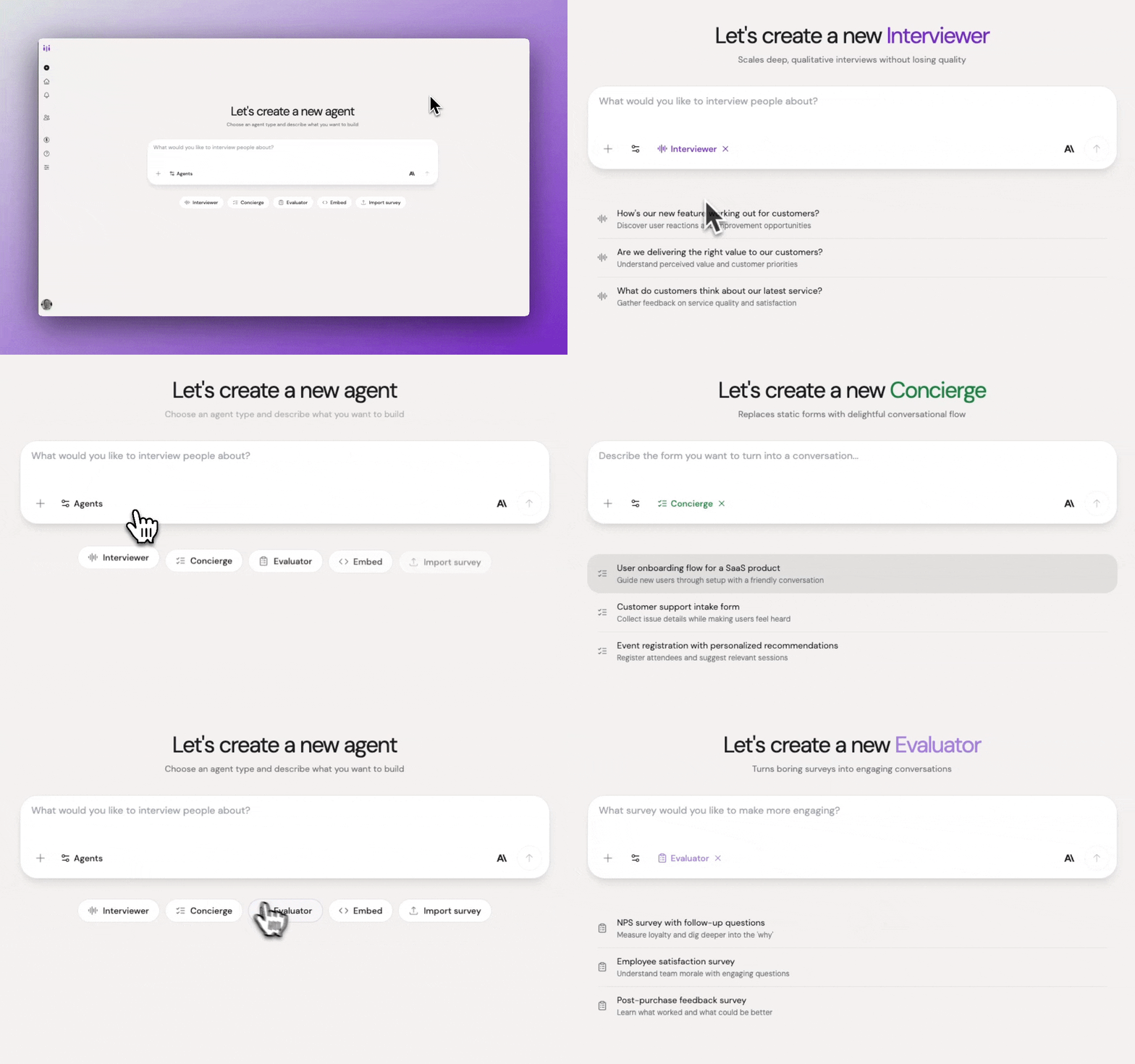
Agent type selection showing Evaluator highlighted
Select Evaluator for surveys and structured feedback collection.
Step 2: Describe what you're evaluating
Explain what you want to measure and why. Perspective will ask you about:
-
Survey objective – What insights do you want to gather?
-
Target audience – Who should you survey?
-
Survey questions – What needs to be asked?
-
Response format – Multiple choice, rating scales, open-ended, etc.
Example:
"I want to survey customers about their satisfaction with our product. Measure overall satisfaction using NPS, then rate satisfaction with specific features on a 1-5 scale: ease of use, feature completeness, customer support quality, and value for money. Finally, ask what we should improve and what their favorite feature is."
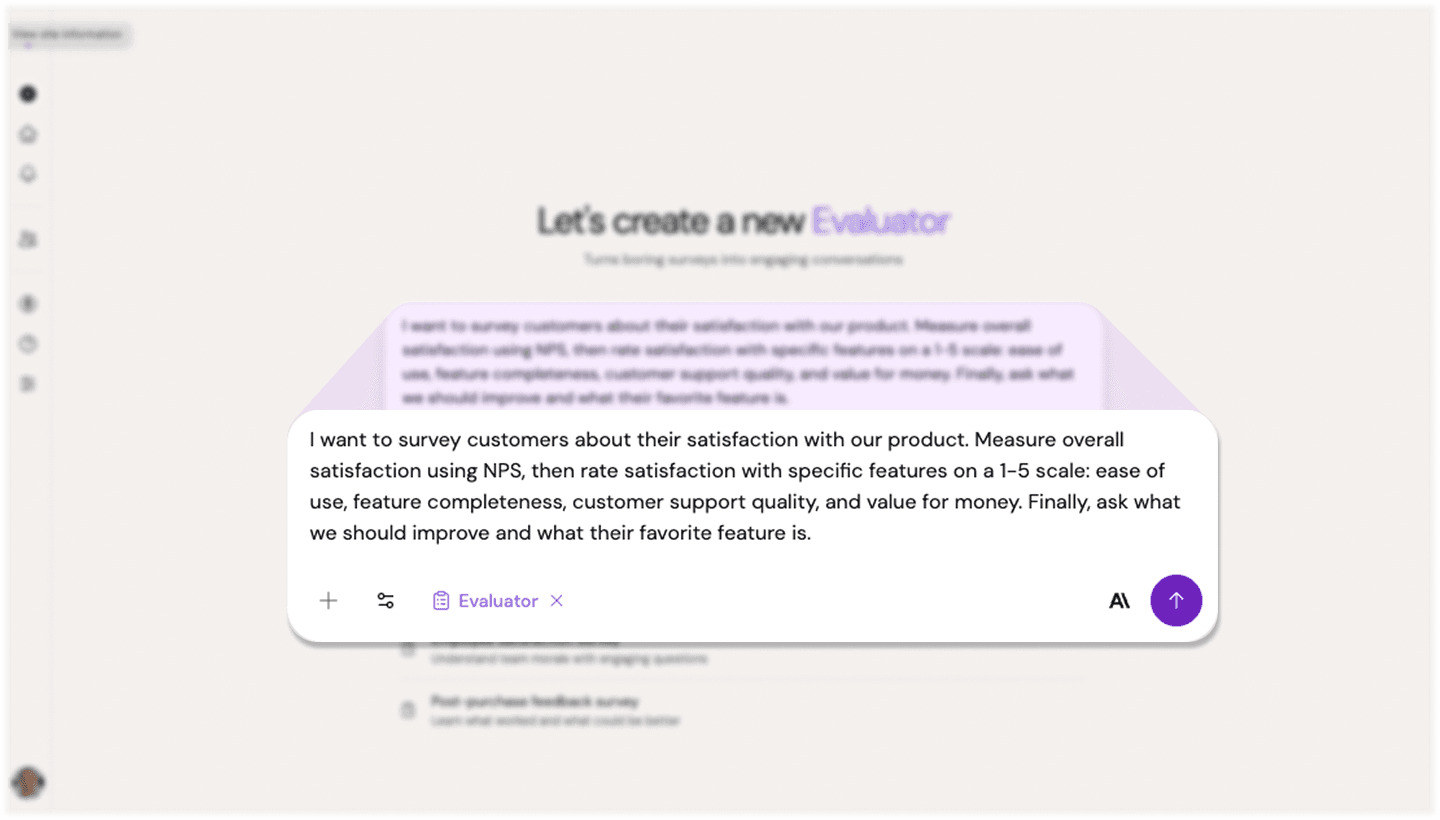
Evaluator description input
Describe what you're evaluating and the metrics you need to capture.
Step 3: Answer clarifying questions
Perspective will assess whether it has enough information to create your outline. If it needs more context about your evaluation criteria, rating scales, or target audience, it will ask focused follow-up questions.
Step 4: Review the generated outline
Once Perspective has sufficient context, it will generate an outline optimized for structured assessment. The outline includes:
Survey objective: What you're measuring and why
Evaluation criteria: List of specific metrics with rating scales
Survey questions: Structured questions presented in conversational format
Interview guidelines: Instructions for presenting scales naturally and collecting thoughtful responses
Optional follow-ups: Conversational probes for context around scores (especially extreme ratings)
Methodology: Confirmation of the structured assessment approach
The outline ensures systematic coverage of all criteria while maintaining conversational tone.
Step 5: Refine your agent
Adjust the outline conversationally to match your needs:
Example refinements:
-
"After low scores (1-3), ask why they rated it that way"
-
"Make it feel casual, not like filling out a corporate survey"
-
"For the improvement question, encourage specific suggestions, not vague complaints"
-
"Keep the whole survey under 5 minutes"
-
"Add a question about likelihood to recommend"
Each refinement updates your outline while maintaining the structured evaluation approach.
Step 6: Test the evaluation
Experience it as a participant would:
-
Click Test or Try it Yourself
-
Try different rating patterns (all high, all low, mixed scores)
-
Evaluate:
-
Does it feel conversational, not form-like?
-
Are scales presented clearly?
-
Does it probe appropriately after low or high scores?
-
Is the length reasonable?
-
Do you feel motivated to provide thoughtful answers?
-
Are questions consistent and clear?
-
Step 7: Iterate and launch
Make adjustments based on your test experience, then invite participants using your preferred method.
Interview Guidelines for Evaluator Agents
Guidelines maintain survey structure while creating engaging conversation.
Default Approach
Evaluator agents naturally:
-
Present rating scales conversationally, not as form fields
-
Ask one evaluation criterion at a time
-
Probe gently for context after extreme scores
-
Thank participants for ratings to maintain engagement
-
Keep momentum without feeling rushed
-
Encourage honest, constructive feedback
-
Aim for 5-10 questions depending on criteria count
Customizing Guidelines
Adjust based on your goals:
For comprehensive feedback:
"After low scores (1-3), ask a follow-up about what specifically disappointed them. After high scores (9-10), ask what we did well. Gather context that helps us act on the data."
For quick pulse checks:
"Move efficiently through ratings. Only probe on scores below 3. Participants appreciate brevity—get in and out under 3 minutes."
For sensitive topics:
"Acknowledge that some questions might feel personal. Reassure participants that feedback is anonymous and used only for improvement. Be empathetic if they share difficult experiences."
For customer surveys:
"Frame questions from the customer's perspective. Instead of 'Rate our support quality,' say 'When you've needed help, how satisfied have you been with our support team?'"
Best Practices for Evaluator Agents
Use consistent scales. Don't mix 1-5, 1-10, and 0-100 in the same survey. Pick one scale and stick with it for comparability.
Order questions strategically. Start with the most important question. If completion drops, you'll have the data that matters most.
Limit the number of ratings. More than 8-10 rating questions creates fatigue. Prioritize ruthlessly.
Ask "why" after extremes. Low scores need context to act on. High scores reveal what's working.
Balance closed and open questions. Mix ratings with 1-2 open-ended questions for richness.
Provide scale context. Define what each number means: "1 = Very Dissatisfied, 5 = Very Satisfied."
End with open feedback. "Anything else you'd like to share?" catches important issues you didn't think to ask about.
Test completion time. If your test takes 8 minutes, participants will take 10-12. Aim for under 5 minutes.
Make it mobile-friendly. Evaluator agents work great on mobile, but test the experience yourself.
Use form fields for scores. This ensures consistent, analyzable data capture.
Common Pitfalls & Fixes
Too many questions → Each additional rating decreases completion rate. Cut ruthlessly to what truly matters.
Vague scale definitions → Participants need to know what "7" means. Provide clear anchors or labels.
No follow-up on low scores → A "2" without context is useless. Probe gently for specifics when scores indicate problems.
Survey fatigue language → Avoid "Please rate..." and "On a scale of 1-10..." Use natural conversation: "How satisfied are you with...?"
All ratings, no context → Include 1-2 open-ended questions. Numbers alone miss nuance and actionable detail.
Burying the key question → Put your most important metric first. Don't assume everyone finishes.
Ignoring mobile experience → Test on a phone. Ensure rating interactions work smoothly on touch screens.
No incentive clarity → If offering incentives for completion, make that clear upfront to boost completion rates.
Inconsistent criteria → Ensure all participants evaluate the same dimensions. Variation breaks comparability.
Example Evaluator Agents
Example 1: Post-Purchase NPS Survey
Evaluation goal:
"Measure customer satisfaction after purchase and identify detractors before they churn."
Key metrics:
-
NPS score (0-10): "How likely are you to recommend us to a friend or colleague?"
-
Product satisfaction (1-5)
-
Purchase experience (1-5)
-
One improvement suggestion (open-ended)
Follow-up logic:
-
Scores 0-6 (detractors): "What disappointed you?"
-
Scores 7-8 (passives): "What would make this a 10?"
-
Scores 9-10 (promoters): "What did we do well?"
What Perspective asks about:
-
Survey objective: Measure post-purchase satisfaction and NPS
-
Target audience: Recent purchasers
-
Survey questions: NPS, product rating, experience rating, improvement area
-
Response format: 0-10 scale for NPS, 1-5 for others, open-ended for improvement
Example 2: Feature Prioritization
Evaluation goal:
"Understand which proposed features users want most to guide product roadmap."
Key metrics:
-
For each of 5 features: Rate importance (1-5) and likelihood to use (1-5)
-
Open-ended: "Which feature would have the biggest impact on your workflow?"
Follow-up logic:
-
High importance + low likelihood: "Why important but unlikely to use?"
-
Low importance: "What would you prioritize instead?"
What Perspective asks about:
-
Survey objective: Prioritize feature development
-
Target audience: Active users
-
Survey questions: Importance and usage likelihood for each feature
-
Response format: 1-5 scales with open-ended context
Example 3: Usability Test Evaluation
Evaluation goal:
"Quantify usability metrics after participants complete tasks in a prototype."
Key metrics:
-
Task completion confidence (1-5)
-
Ease of finding features (1-5)
-
Likelihood to use in real work (1-10)
-
Open-ended: "What was most confusing?" and "What worked well?"
Follow-up logic:
-
Confidence below 3: "What made that task difficult?"
-
Features hard to find: "Where did you expect to find [X]?"
What Perspective asks about:
-
Survey objective: Evaluate prototype usability
-
Target audience: Test participants who completed tasks
-
Survey questions: Confidence, ease of use, likelihood to adopt
-
Response format: Mixed scales with open-ended follow-ups
Combining Evaluator with Other Features
Form Fields: Essential for capturing scores consistently across all participants for statistical analysis.
URL Parameters: Pass context like plan tier or usage level to segment results later without asking.
Completion Flows: Route high scorers to referral programs, low scorers to support or win-back campaigns.
Participant Groups: Survey specific segments and compare results across groups.
Analyzing Evaluator Results
Quantitative Analysis
Evaluator agents provide clean numerical data:
-
Calculate NPS, CSAT, or CES scores
-
Identify distribution of responses (mode, median, outliers)
-
Segment by demographics or behaviors using form fields
-
Track changes over time
-
Compare against benchmarks
Qualitative Context
Review open-ended responses and follow-ups:
-
Thematic analysis of improvement suggestions
-
Common pain points mentioned by low scorers
-
Features praised by high scorers
-
Unexpected insights in "anything else" responses
Statistical Analysis
With sufficient sample sizes:
-
Compare scores across segments (A/B tests, user types, plan tiers)
-
Identify correlations between metrics
-
Test hypotheses with confidence intervals
-
Validate statistical significance of differences
Action Planning
Turn data into action:
-
Low-scoring areas → Improvement priorities
-
High-scoring areas → What to maintain and amplify
-
Specific feedback → Product roadmap inputs
-
Segment differences → Personalization opportunities
Best Response Rates
To maximize Evaluator completion:
Keep it short. Under 5 minutes is ideal. Under 3 minutes is even better for pulse checks.
Explain the value. Tell participants how their feedback will be used and why it matters.
Offer incentives thoughtfully. Small incentives can boost completion, but don't over-incentivize (quality matters).
Time it right. Survey after meaningful interactions, not randomly.
Make it mobile-friendly. Most participants will complete on phones.
Show progress. Let participants know how many questions remain.
Thank participants. Acknowledge their time and the value of their input.
What Makes Evaluator Agents Different
Unlike Interviewer agents (which explore open-ended territories through participant-led conversation) or Concierge agents (which efficiently collect specific information through inference), Evaluator agents systematically assess predefined criteria to generate comparable, quantifiable data. They're designed to make structured evaluation feel conversational rather than transactional, resulting in better engagement and richer feedback than traditional surveys.
Availability
Evaluator agents are available for all Perspective AI customers. Start transforming surveys into engaging conversations today.